(c) Copyright 2001-2003 Foxtalk / Viafox, All rights reserved
This article
was originally published in Foxtalk, december 2001.
Introduction to the Condes Address Model
Viafox
In this article a data
model is presented that supports the entry of addresses of all kinds, such as telephone
numbers, street addresses, e-mail addresses, URLs, and every other type of
address that people might invent in the future. He's worked on a generic
solution that you can use with each customer who allows you to construct the
data model. Here he'll show you how he gave structure to the data model, his
classes, a handful of views, and the forms.

Figure 1 – The four tables of
the Condes Address Model. Note that there’s no field for last name, et cetera.
Let me begin with a picture
of the Condes Address Model (see Figure 1). There are only four tables
involved! I'll start by explaining the way I name fields—the first character
denotes the datatype, and the next three characters uniquely identify
the table. This three-character section could be referred to as the table
descriptor. Thus, any field name conflicts in views are effectively
prevented, and you're also told what table a field in a view originated from.
An underscore is used to ease the reading of the field descriptor on the
right. Certain fields have special field descriptors. In the model, all primary
keys have "PK" as the field descriptor. The field descriptor of a
foreign key field is determined by the table descriptor of the linked table,
followed by an underscore, followed by "FK." That's all for fields.
There's also a special rule
for the naming of crosstables. In the example, the Rel_Adr_Whn table is a
crosstable that links the tables Relation (people or companies), Address, and
WhenToUse. Hopefully, you now understand the name of the Rel_Adr_Whn table.
Although it's primarily a crosstable, it's also the right place to store
certain information that's unique for a combination of linked records only.
In the data model, the
crosstable Rel_Adr_Whn is the central place, rather than the Relation table. As
a matter of fact, I've decided that it's best for the Address Model to even
entirely exclude the Relation table! The information about the relation
is restricted to the single field iRaw_Rel_FK in the crosstable, a situation
that'll ease the coupling with eventual existing data structures.
At this point, it should be
clear to you that, contrary to traditional data models, the Relation table
itself is no longer the "obvious" place where one would store certain
addresses of the relation. On the contrary, it's now obvious that it's not
the place for addresses. If you want the relation's addresses, you need to take
the relation's ID and select all records in the crosstable that have the same
value in the related foreign key field. You'll also have to make a link from
the crosstable into the Address table. And if you only want addresses of a
certain type, you'll have to set a filter on the address type.
Examples of address types
might be:
|
cAdt_Descr |
cAdt_Short |
Example |
|
Telephone |
tel |
06 666 111 88 |
|
Telefax |
fax |
023-5346643 |
|
Street Address |
stree |
M. Emantsstraat 123 - 2011 HH Haarlem |
|
E-mail |
email |
info@viafox.nl |
|
URL |
url |
www.viafox.nl |
Note that there aren't
separate address types for private addresses vs. addresses that are connected
to work. It was during my vacation in France that I had the time to think over
this and other aspects, and I feel a need to tell you about those days...
It was in the tiny village
Condes, in the French Jura, while camping on the shore of a beautiful lake on a
beautiful day, that I took all the time in the world to think over a problem
that I'd had with an earlier version of the Address Model.
A year before, I developed
a model that contained a table "function" with records like
"friend," "family," "account manager,"
"programmer," and so on. That table also contained a logical field
"bizness." The idea was that a function is either bizness-related or
not, so this field might then be used to distinguish between phone numbers that
are used for work vs. those that are private. However, I had a lot of trouble
implementing the model. While in theory it all sounded okay, it was a really
big hassle to code in the real world. In those days, I also worked on a project
with Andy Kramek and Marcia Akins. One day, I demonstrated the model to Andy,
and he told me that others had tried similar models and had concluded that it's
simply too complex to implement in the real world. Later, I came to the same
conclusion, and ultimately I postponed the further development of the model.
But in Condes, I felt it
was time to reconsider things. I tried to let new assumptions come into my
mind. This requires you to think "lateral," as Eduardo De Bono said
long ago. New assumptions will only come to mind if you're prepared to
recognize your current assumptions and no longer take them for granted, no
matter what advantage they gave you in the past. I felt it to be a breakthrough
when I considered the idea that people, in search of an address, don't really
search on "function," but rather have in mind what the relation
communicated about the address. The idea is that the relation always
communicates when to use the address! For example, John tells Martin to
use phone number xxx when he's at work and phone number yyy when he's at home,
and he wants people to use zzz when he's on vacation next week, and so forth.
The model that came to my
mind didn't need a function table. Rather, it needed a WhenToUse table, and
that's exactly what I've done. But the considerations also made it clear to me
that addresses aren't always exclusively owned by a relation. Rather, the
relation uses an address during a definitive or indefinitive period, and it may
well be that other people also use that address, or have used it before, or
will use it some day in the future. This aspect made me realize that it's
better to leave out-of-use addresses intact and reuse them whenever another
relation starts to use that address. It also became clear to me that whenever a
relation confronts you with an address change, you need to check whether the
change should also be applied to other relations who use the address. A good
model must account for these aspects as well.
The new foundation for my
Address Model was laid down, and in remembrance of that day, I decided to name
the model after the village.
So, these contemplations
should also explain the important place of the WhenToUse table in the Address
Model. One might start with an empty table, but it's more likely that you want
to start with certain entries and allow the user to add other entries. For
example, I imagine that you add at least the entries "at work" and
"at home" (read "when at work" and "when at
home"). The data entry should ensure that each entry of this table can't
be removed. Thus you can use at least the basic entries in your code, enabling
you to print the addresses that are work-related (as an example) in reports and
on screen. It's my experience that the number of records in this table will
remain limited, even after many years. The rest of the model implies that
records in this table will never become obsolete, for the model assumes you'll
never want to physically delete outdated addresses.
On the other hand, you do
need to instruct (and maybe even brainwash) the users of the model, for they'll
have to understand how to "read" things. They have to be made aware
of the underlying concept!
Another peculiarity is that
the field cAdr_Address, which has the actual address, is of type character, no
matter what type of address we're dealing with. Luckily, even multi-line
addresses that the user enters with an edit box fit into this type of field. The
ASCII codes 13+10 will be stored (and restored) nicely, together with the
normal characters. A length of 60 will probably suffice. Such a length may look
terribly long for a phone number, but why would we mind about that? Storage
capacity is no longer our main concern, and speed is still okay, for we're not
dealing with memo fields (which would give slower times indeed, I guess). And
on the other hand, another feature of the model will save capacity.
That feature is the fact
that any address should be stored only once, and all relations who share
a certain address should be linked to the same primary key in the address
table! This also implies that an obsolete address may come into use again. Of
course, this has to be realized by the programmer.
At this point, you may be
puzzled about the fact that I not only store street addresses in the Address
table, but also phone numbers, URLs, and so forth—things that people aren't
directly seeing as addresses, but as entities of another kind. But I do think
of them as addresses. In my opinion, an address is some code that lets you
get in contact with a relation or, even more abstract, with an entity. It's
information about where and how someone or something can be reached. This
usage of the word "address" enabled me to simplify the model. Also,
new types of addresses can be added without any effort of the programmer. Since
the day I adopted this definition of an address, I got used to it very quickly,
and now the concept is obvious and natural to me. I'm sure that users will also
adopt it quickly and easily. But again, you'll need to instruct the users and
make them aware of the underlying concept!
You may wonder about the
relationship between the WhenToUse table and the Addresstype table. I want to
make you aware of an interesting problem that the user may encounter. As should
be clear at this point, on the one hand, the Addresstype table is used to
distinguish between a telephone number and an e-mail address; on the other
hand, the WhenToUse table lets us distinguish between a telephone number that
should be used when the relation is at home, vs. the number that should be used
when the relation is at work. But it may happen that the user will try to
bypass the use of the WhenToUse table. The user might decide to create address
types "Telephone at work" and "Telephone at home," for
instance. I want to emphasize that this would not be good practice at all. You
should try to prevent such abuse. Again, you'll need to instruct the users and
make them aware of the underlying concept!
There's one more point
about data entry that I'd like to emphasize. It's about the mindset of the
user, or even about the procedures of the organization when it comes to
entering new addresses and making changes to them. Traditionally, when entering
a new address, we select the relation first. This procedure remains the same in
my model. But how about changing a relation's address? Traditionally, in this
situation too, we select the relation first. But in the Condes Address Model,
there's no need to do that. As a matter of fact, it's even better not to
do that! Rather than selecting a relation first, we simply type in the address
and let the program search for all relations who use this address. Then
we can offer the user the opportunity to change the address with regard to one,
some, or all relations that were found! This principle should be
implemented in the program by the programmer. But, still, I think it's wise to
make the users aware of the underlying concept.
Implementing the model in the real world
It's nice to
develop new theories and models, but they're worthless if they're not easy
enough to implement in the real world. As I mentioned earlier, Andy's comment
about my previous model was that similar models had proven to be a hassle to
implement in real life. I realized that I needed to test my model in this
respect. So I did...
I developed two databases,
six views, two classlibs, and nine forms.
The main database contains
the tables of the Condes Address Model. The second database contains a Relation
table, for testing purposes.
The Condes database
contains four views:
•
A view to retrieve the address types.
•
A view to retrieve the "when to use" descriptions.
•
A view to get zero or more addresses based on the ID of a relation, the short
of an address type, and a "when to use" description. The latter two
view parameters might contain wildcards.
•
A view to get zero or more IDs of relations based on an address and the short
of an address type. Both view parameters might contain wildcards, and the
search for the address is case-insensitive.
The Relation database
contains two views:
•
A view that retrieves information about the relations who use a certain
address. It's also an example of the way a Condes view can be linked to the
Relation table.
•
A view that will get the name of a relation based on the relation's ID that's
stored in the crosstable.
The main classes in the
Condes classlib are:
•
A custom class that specializes in the data handling. It's the interface to the
(read-only) views, and it also has a Save() method that's used to save a new
address and a Thru() method that's used to outdate the address or modify the
thru date of the address.
The
Save() method will always create a new record in the crosstable, but it will
only create a new record in the Address table if it was unable to locate a
previously stored equal address in that table.
Note
that an address change can be realized by first outdating the current entry
with the Thru() method and then calling the Save() method, which creates a new
entry. This procedure also ensures that we can retrieve obsolete addresses at
any time.
•
A custom class and a container class that handles several "options"
we're going to need to offer to the user. The user will want to set a filter to
obsolete, current, and/or future addresses. And there's also an "automatic
search" option.
•
A container class to enter a new address.
•
A container class to search for relations who use a certain address.
•
A container class to display addresses that are used by a certain relation.
•
A container class that enables the user to change an address for one, some, or
all relations who use the old address.
•
A container class that enables the user to outdate an address or modify the
thru date of an address for one, some, or all relations who use the address.
The only class in the other
classlib is a custom class that specializes in the data handling of the
Relation table. It's the interface to the read-only views. There's no Save()
method, for changing the Relation table wasn't part of the tests that I did.
The forms are the hosts for
the various containers and custom classes, as described here:
•
One form can be used to change the Addresstype table. It's really only a very
simple grid control with its RecordSource property set to that table.
•
In the same vein, another form can be used to change the Relation table. This
too is a very simple grid control with its RecordSource property set to that
table. Remember that we're not testing the Relation table!
•
One form is the host of the container that lets the user enter a new address.
•
One form is the host of the container that lets the user change an address.
•
One form is the host of the container that lets the user outdate an address or
modify the thru date of an address.
•
One form is the host of the container that lets the user search for those who
use an address.
•
One form lets the user select a relation and then shows the addresses of that relation.
Moreover, it provides push buttons that will call some of the aforementioned
forms.
•
One form contains five tabs, each one hosting a previously mentioned container
(see Figure 2). Thus, this form offers all of the functionality the user needs
with regard to addresses.
•
The final form is an as-top-level form. It enabled me to build an executable
that demonstrates the various forms.
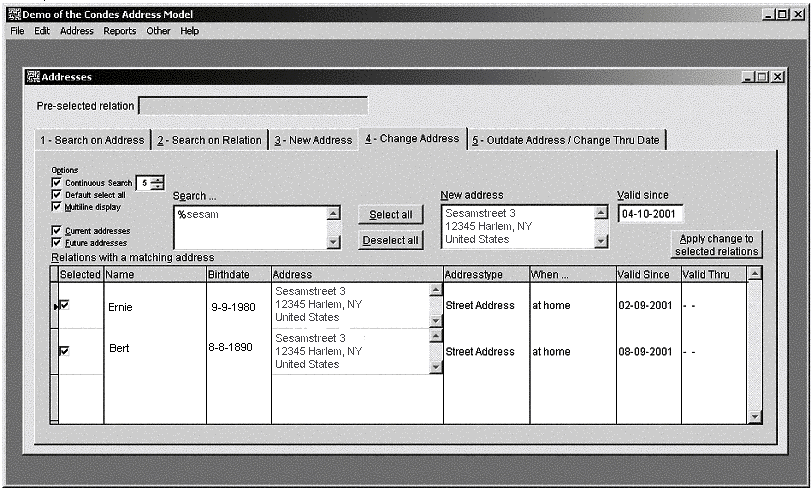
Figure 2 – The five-tab address form. Rightclicking on an address is enough
to start drag-and-drop.
In the beginning, all of my
attention was focused upon implementing the Address Model itself. It was the
phase of development of the databases, the views, and the custom classes that
specialize in data handling. Was it difficult? No!
Encouraged, I went on and
developed the various containers and the forms that host a single container.
Was it difficult? No!
Then I developed the form
with the push buttons. Was it difficult? No!
Finally, I started on the
form with the tabs. Was it difficult? Yes! But was that because of the Address
Model? No. The difficulties that I encountered are the kinds of difficulties I
encounter each time I use a multitude of grids on several tabs that depend on
each other and therefore have to be refreshed under certain conditions.
My overall conclusion is
that this Address Model, contrary to previous attempts, is easy to implement.
Moreover, when you use my databases, views, classes, and forms, it may even
prove to be peanuts. I hope.
Conclusion
You're free to try
the Condes Address Model. Each class and form has a Documentation() method that
contains hints on how to use the class or form. I'm sure you'll find ways to
extend the functionality. For example, you might decide to add a field to the
WhenToUse table, enabling you to offer the user either a restricted list or a
full list, depending on the setting of a programmed option group. Another idea
is to add a field to the Addresstype table that contains an input mask for that
kind of address. And another field might be used to store the name of a
validation routine for that specific kind of address type.
Think lateral, and you'll
start wondering why on earth you stayed with the traditional model for so long.
Download
the example and source code